
SnapStream's Transcription feature can be utilized in two different ways:
- Live Transcription:
Live Transcription can be executed on any recording or stream that is captured by SnapStream. When you set up your recording job, custom stream, or event, you will find the Live Transcription option. If you are creating a recording job through the Program Guide, you'll need to modify the job post-creation to access this option. Prior to activating the feature, review the Transcription Minutes Remaining line below, as it will show how many minutes you have available for the month. Click here for further detailed instructions Stream Page and/or Scheduler page. - Post Transcribe:
If you forgot to activate it for a recording/event or if a recording that has already finished lacks closed captions, you can still have it transcribed. Click here for further detailed instructions.- Navigate to the Library at the top.
- Locate your recording/clip and select it by clicking on the box to the left of it.
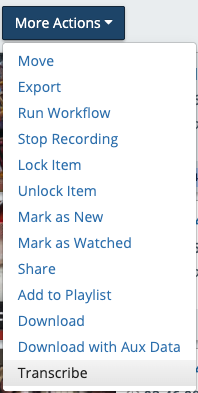
- Go to the top of the page and click on the More Actions button.
- Select Transcribe towards the bottom of the list.
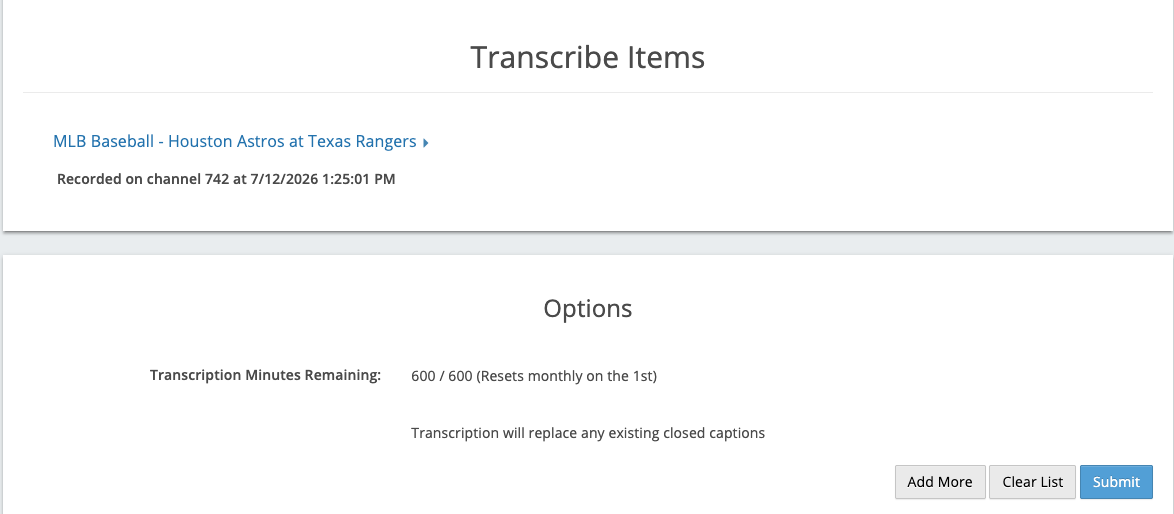
- A confirmation page will be displayed featuring the recordings/clips you intend to transcribe, along with a note indicating how many minutes you have remaining next to Transcription Minutes Remaining.
- In the bottom right corner, you have various options: Add More, Clear List, or Submit. Once you are prepared to send it for transcription, please select Submit.
FAQ:
- How does it work?
SnapStream extracts the audio from the recording and then utilizes speech-to-text technology to convert it into text. - My transcription stopped generating during a Live session, what can I do?
If your transcription has ceased generating for more than 15 minutes, we suggest restarting the recording that you are presently engaged in. - How long does a post transcribe take?
The duration can change based on the length of the recording/clip you provided; the audio analysis and transcription generation process is quicker than real-time, meaning you won't have to wait too long. - I ran out of minutes, what do I do?
Please contact your Customer Success Representative if you are interested in increasing the amount of minutes in your transcription license.